
Sum by group in a table
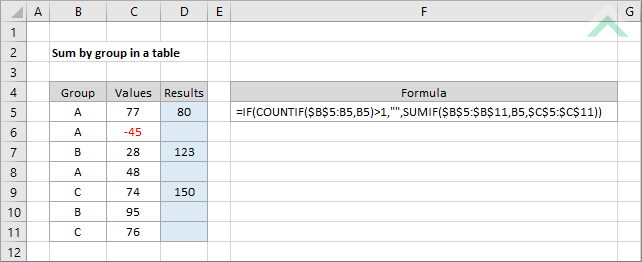
This tutorial shows how to sum by group in a table that returns the summed valued of the associated group against the first occurrence in a table by using an Excel formula, with the IF, COUNTIF and SUMIF functions
|
GENERIC FORMULA
=IF(COUNTIF(dynamic_group_rng,group)>1,"",SUMIF(group_rng,group,sum_rng))
ARGUMENTS EXPLANATION |
RELATED TOPICS
| Related Topic | Description | Related Topic and Description |
|---|---|---|
| Sum by group | How to sum values by group | |
| Rank by group | How to rank a number by group |
RELATED FUNCTIONS
| Related Functions | Description | Related Functions and Description |
|---|---|---|
| COUNTIF Function | The Excel COUNTIF function returns the number of cells in a range that meet a specified criteria | |
| IF Function | The Excel IF function performs a test on specified conditions entered into the formula and returns a specified value if the result is TRUE or another specified value if the result is FALSE | |
| SUMIF Function | The Excel SUMIF function returns the sum of all numbers in a specified range based on a single criteria |