
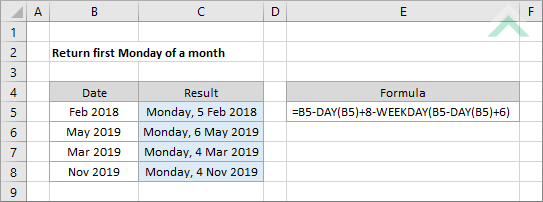
Return first Monday of a month
This tutorial shows how to find the first Monday of a month using an Excel formula, with the DAY and WEEKDAY functions
|
GENERIC FORMULA
=month-DAY(month)+8-WEEKDAY(month-DAY(month)+6)
ARGUMENTS EXPLANATION |
RELATED TOPICS
| Related Topic | Description | Related Topic and Description |
|---|---|---|
| Return first day of a month | How to return the first day of a specific month | |
| Return last day of a month | How to return the last day of a specific month |
RELATED FUNCTIONS
| Related Functions | Description | Related Functions and Description |
|---|---|---|
| DAY Function | The Excel DAY function returns the day from a specified date | |
| WEEKDAY Function | The Excel WEEKDAY function returns a number between 1 and 7, representing the day of the week based on the return type that has been selected |